Google’s Factory Reset Protection (FRP) is a critical security feature on Android devices running Android 5.1 (Lollipop) and later. For Samsung users, FRP provides a necessary layer of defense, ensuring that a stolen or lost device cannot simply be factory reset and used by an unauthorized person. After a factory reset performed outside of the device’s main settings (e.g., via recovery mode), the FRP lock is triggered, demanding the credentials of the last Google account synced to the device.
While a vital security tool, the FRP lock can become an infuriating barrier for legitimate owners. This is often the case if you have forgotten the original Google account credentials, or if you purchased a second-hand Samsung phone that the previous owner failed to unlock properly. This is where specialized methods, including the use of a Samsung FRP Bypass APK or professional desktop software, come into play.
The Challenge of the FRP Bypass APK
Historically, a common approach to circumventing the FRP lock involved using an FRP Bypass APK (Android Package Kit). The term “FRP Bypass APK” refers to a file that exploits a security loophole in a specific Android or Samsung OS version. By installing this APK through a clever workaround—often involving the use of the emergency dialer, Bluetooth, the talkback feature, or injecting a shortcut to the device’s settings—users could gain temporary access to the device’s settings menu to factory reset the phone again, this time removing the Google account completely.
How the APK Method Traditionally Worked:
- Exploiting an Entry Point: The user would navigate the locked setup screen to find an interactive element, such as a keyboard with a search function, a “Terms and Conditions” link, or the emergency call screen.
- Launching a Browser: They would use this entry point to launch a browser (like Chrome).
- Downloading the APK: The user would download the specific FRP bypass APK file to the device’s internal storage.
- Installing and Resetting: To install the third-party APK, the user should navigate to the file manager or settings menu. This installed application would often grant administrative privileges or open the main Settings app, allowing the user to initiate a new factory reset from within the device, thereby bypassing the FRP lock.
However, relying on a generic FRP Bypass APK today is highly unreliable. As soon as Google or Samsung identifies an exploit, they issue a security patch, rendering that particular APK useless. Consequently, the success rate for APK-based bypasses is low, and users often waste hours searching for a compatible, non-malicious file.
The Professional Solution: iMobie DroidKit
Given the constant security updates from Samsung, the most reliable and efficient way to bypass the FRP lock is through dedicated professional desktop software. Tools like iMobie DroidKit offer a one-click, secure solution that eliminates the risk and complexity associated with manually installing various APK files.

DroidKit is specifically engineered to adapt to different Samsung models and Android versions, ensuring a higher success rate by deploying a customized bypass protocol for your specific device configuration.
 How iMobie DroidKit Bypasses Samsung FRP
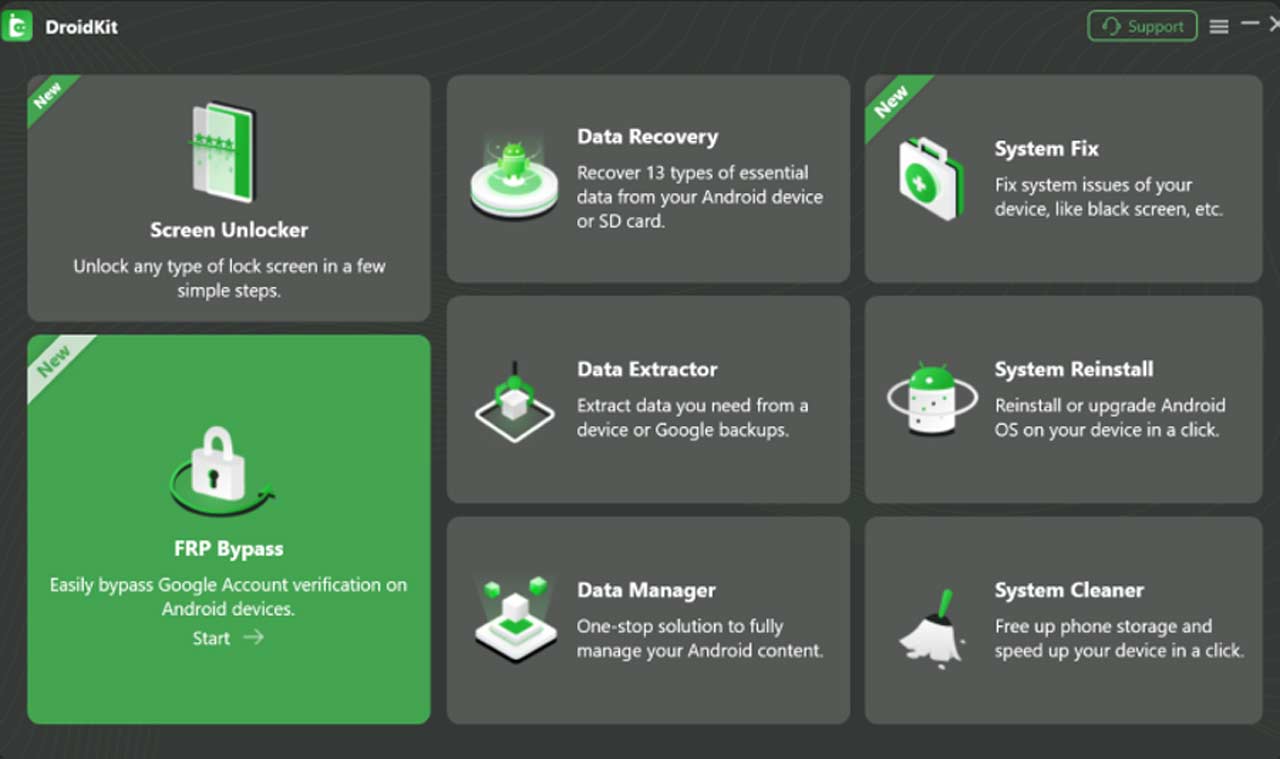 How iMobie DroidKit Bypasses Samsung FRP
DroidKit operates by leveraging system exploits in a controlled environment, essentially creating a configuration file to force a bypass. The process is streamlined into a few easy steps, eliminating the need for technical expertise:
- Connect and Launch: Connect your locked Samsung device to your computer and launch DroidKit. Select the FRP Bypass feature.
- Prepare the Configuration: DroidKit automatically detects your device model and prepares a custom configuration file for your specific Samsung device and Android OS version.
- Enter Recovery Mode: The program will guide you through putting your device into Recovery Mode, which is a key step in the bypass process.
- Execute the Bypass: DroidKit analyzes the system and, with your confirmation, executes the bypass, removing the Google account verification lock.
- Final Reset: Once the bypass is complete, the device will reboot, allowing you to set it up as a brand-new phone without being prompted for the previous Google account credentials.
Why Choose Professional Software Over APKs?
| Feature | FRP Bypass APK Method | iMobie DroidKit |
| Reliability | Low. Depends on finding a working exploit for your exact OS version. | High. Continuously updated to support the latest Samsung models and Android OS. |
| Safety | High risk of downloading malware or corrupted files. | Safe and secure. No risk of installing malicious software on your phone or computer. |
| Complexity | Extremely high. Requires complex steps to get the APK file onto the locked device. | Low. A guided, click-through process suitable for all users. |
| Device Support | Only works for the specific models the exploit was designed for. | Supports a wide range of Samsung devices and Android versions (Android 6 to 15). |
Final Thoughts
While the allure of a free, simple APK method persists on the internet, the reality is that the safest, fastest, and most reliable solution for bypassing the Samsung FRP lock in today’s security landscape is a proven professional tool like iMobie DroidKit. It turns a frustrating, multi-hour process into a simple, guided operation, allowing legitimate owners to regain control of their devices.