HBO Max downloads not working? The common “Download Failed” error often appears when trying to save content for offline viewing. Fortunately, the issue is usually easy to fix and can be resolved with a few quick steps. In the 2025 renewed guide, we lead you through the top 5 methods to resolve the HBO Max download failed problem. Whether it’s a bug in the app or a conflict with your VPN, this guide will help you fix the issue and download HBO Max shows on laptop for offline viewing.
Part 1: Reasons for HBO Max Download Failed
Understanding what’s behind the download failure is key to fixing it. The most common causes include:
- Server-side outages: If HBO Max servers are down, then downloads won’t start.
- Outdated app build: bugs or incompatibility issues in a newer version of the applications.
- Corrupted cache/data: HBO Max may be storing/retrieving content in/at this can interfere with.
- VPN or proxy interference: these often conflict with the imposed regional restrictions of HBO Max.
- Weak / Unstable internet connection: Without a continuous Wi-Fi signal, downloads may fail.
Each of these issues is fixable with the right approach, as we’ll explain next.
5 Fixes for HBO Max Download Failed Issue
Way 1: Fix Max Download Failed with Keeprix Video Downloader
For an easier solution of HBO Max download failed hassle, Keeprix Video Downloader is a good choice. It is a professional HBO Max Video Downloader to save HBO Max Videos and have ability to save Movies and Series in High Quality Up to 1080p with multiple audio tracks. This tool is able to let users directly download the content to the laptop in MP4 format. It is perfect for offline viewing over any device without worrying about the expiration of the content and the regional problems in case of viewing. It’s a more unproblematic option for users wishing to obtain full control over their content that they have been streaming.
Steps to Download Max Shows Using Keeprix Video Downloader:


Step 1. Download and install Keeprix Video Downloader on your Mac. Launch it and select “Max” from the platform options.
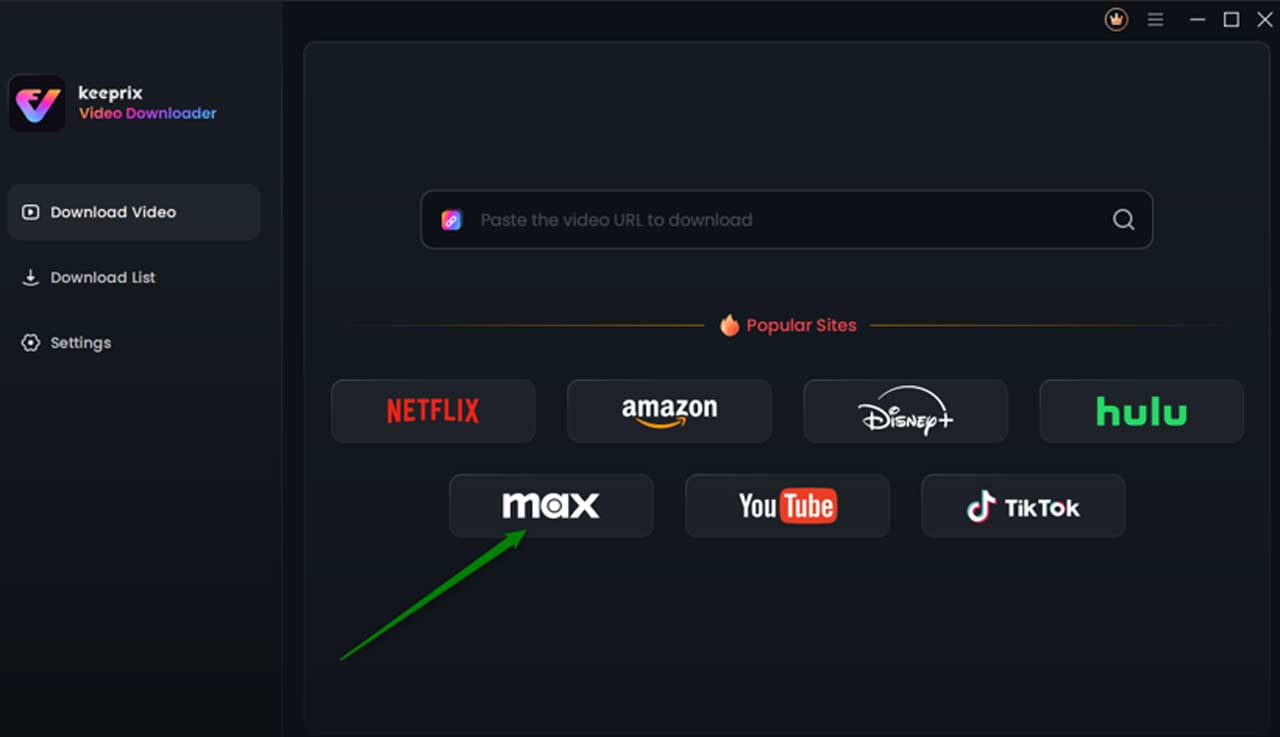
Step 2. Sign in to your Max account. Find the show you want to download. Alternatively, paste the video URL in the address bar to find it quickly.
Step 3. Select the video from the search results. Then, click the “Download” icon. Then you can adjust the download settings, including Resolution, Audio, Subtitle, and Subtitle Type.
Step 4. After that, click the “Download” button. Then your videos will start downloading directly on your Mac.
Way 2: Check HBO Max Service Status
To begin with, you can check if the problem is with HBO Max itself. Visit Downdetector or IsItDownRightNow and check the service status. If it is an outage that they are aware of, then I am afraid there is nothing to be done except waiting for the issue to be resolved.
Way 3: Update the HBO Max App
An outdated app can lead to all manner of trouble, even from failed downloads. Head over to your device’s App Store (if you’re on iOS) or Google Play (if you’re using an Android), and see if there are any available updates. Always keep it updated to the latest version to enjoy the best performance and avoid any incompatibility with HBO Max’s servers.
Way 4: Clear Cache and App Data
Corrupted cache or data saved can cause interference with downloads happening successfully.
- For Android users: Go to Settings > Apps > HBO Max > Storage > Clear Cache & Clear Data.
- For iOS users: Uninstall the app and then reinstall it. This kind of refresh would help in working the application fine without any old conflicts and further, let the clean downloads begin
Way 5: Disable Your VPN
HBO Max is quite strict with its geo-restrictions, and a VPN can mess up the download permissions or even prevent downloading. Turn off any VPN or proxy service that you might have on the device and then re-open the application; this solves the download failed message in many instances.
Conclusion
The HBO Max download failed issue is one of those frustrating but easily fixable ones. Bad connection, app bug, or VPN conflict may be behind it, but going through the above steps will have you offline viewing again in no time. If you’re frequently dealing with download errors, using Keeprix Video Downloader can help download HBO Max content without any issues. Try Keeprix Video Downloader to enjoy hassle-free streaming wherever you go.