An AI slides generator is a tool that uses artificial intelligence to create presentation slides from prompts, documents, outlines, notes, or other source materials. Instead of opening PowerPoint or Google Slides and building every page manually, users can generate a first draft in minutes.
A good AI slides generator should do more than create basic text slides. It should help with slide structure, content organization, visual layout, and export flexibility. For business users, the most important factors are usually clear presentation logic, editable output, professional design, and support for different content formats.
Whether you are creating a pitch deck, business report, lesson presentation, marketing update, or client proposal, AI slide tools can reduce repetitive work and help you move from rough ideas to a usable deck much faster.
1. Dokie AI
Best for: Editable, business-ready PowerPoint presentations


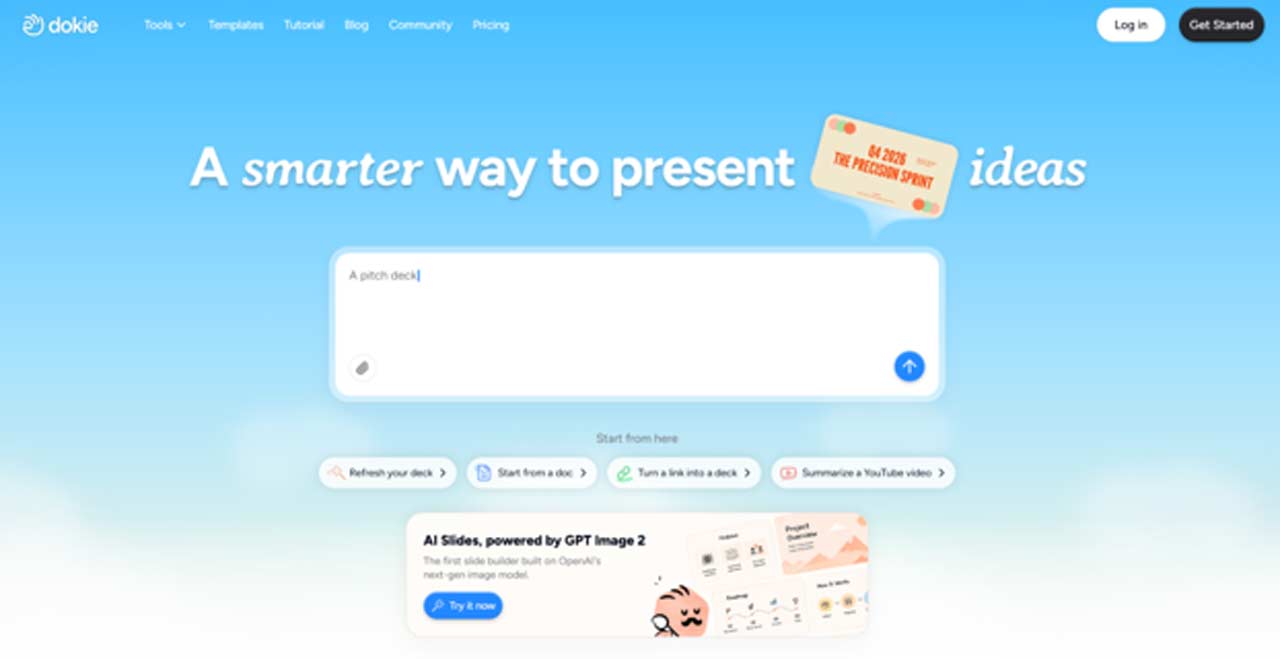
Dokie AI is one of the best AI slides generators for users who need practical and professional presentations. It is designed to help users create clean, structured, and editable slide decks from prompts or existing materials.
Unlike some AI presentation tools that focus mainly on visual storytelling or web-style pages, Dokie AI is more focused on real presentation workflows. This makes it especially useful for business reports, marketing decks, pitch decks, training materials, client presentations, product introductions, and internal meeting slides.
One of Dokie AI’s biggest strengths is its support for different content-to-PPT tools. Many users do not start a presentation from a blank prompt. They already have a document, spreadsheet, PDF, screenshot, or web page. Dokie AI helps turn those materials into slides faster.
Key Dokie AI tools
Text to PPT helps users turn notes, bullet points, outlines, or rough ideas into a complete presentation. It is useful when you already have the main content but need help structuring it into slides.
Word to PPT is useful for converting reports, proposals, articles, meeting notes, or long-form documents into presentation decks. It helps summarize written content and organize it into a slide-friendly format.
PDF to PPT helps users convert PDF files into slides. This is useful for white papers, research papers, company reports, training documents, course materials, and other long PDF content.
Excel to PPT is designed for users who need to present spreadsheet data, KPI reports, sales numbers, marketing results, budget summaries, or performance updates.
JPG to PPT and PNG to PPT help users turn screenshots, diagrams, scanned materials, and image-based content into presentation slides.
HTML to PPT is useful for converting web pages, landing pages, online reports, product pages, or structured HTML content into slide decks.
Why choose Dokie AI?
Choose Dokie AI if you want an AI slides generator that creates practical, editable, and business-ready presentations. It is especially valuable when you need to turn existing content into PowerPoint-style slides without rebuilding everything manually.
2. Gamma
Best for: Modern storytelling and web-style presentations
Gamma is a popular AI presentation tool for users who want to create modern, visually engaging presentations quickly. It can help turn a prompt into a polished presentation, document, or web-style page.
Gamma is especially strong for storytelling. Its output often feels more like a modern visual document than a traditional slide deck. This makes it useful for startup ideas, product explainers, educational content, internal updates, and async sharing.
For users who want a clean, interactive presentation experience, Gamma can be a great choice. It helps remove the blank-page problem and gives users a visually polished draft quickly.
However, Gamma may not be the best fit for every workflow. If your final goal is a traditional editable PowerPoint deck, you may need to review and adjust the exported file. Gamma is excellent for visual communication, but some business users may prefer a tool that is more focused on standard PPT workflows.
Why choose Gamma?
Choose Gamma if you want modern presentation design, visual storytelling, and web-style sharing. It is a strong option for users who care more about presentation experience than strict PowerPoint formatting.
3. Canva AI Presentation Maker
Best for: Design flexibility and creative customization
Canva is one of the most flexible tools for creating presentations with AI. Its AI presentation features help users generate slide drafts from prompts, while its design editor allows deep customization with templates, graphics, images, fonts, icons, and brand assets.
Canva is especially useful for marketers, creators, educators, small businesses, and social media teams. It gives users a large design ecosystem, making it easy to polish slides visually after the AI creates the first draft.
Compared with more business-focused AI slide tools, Canva is stronger in design control. Users can choose from many templates, apply brand kits, edit layouts, and add creative elements. This makes it useful for presentations that need to look visually appealing and branded.
The main limitation is that Canva may require more manual editing if you need a highly structured business deck. Its design tools are excellent, but the AI-generated content may still need refinement for complex business topics.
Why choose Canva?
Choose Canva if you want an AI slides generator with strong visual editing, templates, brand customization, and creative design flexibility.
4. Beautiful.ai
Best for: Consistent team presentations
Beautiful.ai is a presentation tool focused on smart design and brand consistency. It helps users create clean, professional slides with layouts that automatically adjust as content changes.
This makes Beautiful.ai especially useful for teams that create a lot of presentations. Sales teams, marketing teams, startups, and business departments can use it to keep decks consistent without requiring every team member to be a designer.
Beautiful.ai’s biggest advantage is its design guardrails. The tool helps prevent messy layouts and keeps slides visually balanced. This is valuable when multiple people are creating decks for the same brand or company.
Compared with Dokie AI or Gamma, Beautiful.ai is less about flexible content conversion and more about maintaining polished slide design. It is a good choice for teams that care about visual consistency and presentation standards.
Why choose Beautiful.ai?
Choose Beautiful.ai if your team needs professional, on-brand presentations with smart layouts and fewer design mistakes.
5. Microsoft Copilot for PowerPoint
Best for: Microsoft 365 and PowerPoint users
Microsoft Copilot for PowerPoint is a strong option for users who already work inside Microsoft 365. It helps users create, rewrite, summarize, and improve presentations directly in PowerPoint.
The main benefit is workflow convenience. Many companies already use PowerPoint as their default presentation tool, so Copilot fits naturally into existing work habits. Users do not need to move content into a separate AI presentation platform.
Copilot is especially useful when your materials already exist in Microsoft tools, such as Word documents, meeting notes, emails, or internal files. It can help turn those materials into slides and assist with rewriting or improving presentation content.
However, Copilot may not be the best choice for users who want a specialized AI presentation platform with multiple content-to-PPT tools. It is most valuable for teams already committed to the Microsoft ecosystem.
Why choose Microsoft Copilot?
Choose Microsoft Copilot if you already use PowerPoint and Microsoft 365, and you want AI slide generation inside your existing workflow.
How to Choose the Best AI Slides Generator
The best AI slides generator depends on your workflow and final output.
If you need professional, editable, PowerPoint-style presentations, Dokie AI is a strong choice. It is especially useful if you often work with documents, PDFs, spreadsheets, images, or web content and want to convert them into slides.
If you care more about modern storytelling and web-style sharing, Gamma may be a better fit. If visual customization matters most, Canva is one of the easiest tools to use. If your team needs brand consistency, Beautiful.ai can help keep decks polished. If your company already works inside Microsoft 365, Copilot is the most convenient option.
Before choosing a tool, consider these questions:
Do you need editable PPT export?
Do you want to convert existing documents or files into slides?
Do you care more about business structure or visual storytelling?
Will your team edit the deck in PowerPoint or Google Slides?
Do you need brand consistency across multiple presentations?
The right tool should help you create slides faster while still giving you enough control over the final deck.
Final Verdict
AI slides generators can save a lot of time by helping users turn ideas, notes, documents, and data into complete presentations. They are especially useful for people who create decks regularly and want to avoid starting from a blank page every time.
Among the best AI slides generators, Dokie AI is one of the strongest options for business users because it focuses on editable, practical, and professional presentation workflows. Its tools like Text to PPT, Word to PPT, PDF to PPT, Excel to PPT, JPG to PPT, PNG to PPT, and HTML to PPT make it useful for many real-world use cases.
Gamma, Canva, Beautiful.ai, and Microsoft Copilot are also strong choices, but each serves a different need. The best AI slides generator is the one that matches how you actually create, edit, and present slides.