Type three words into an image-to-video tool, and you will receive a warping mess: an arm bent in a strange way, a melting face, and a camera moving in some undefined direction. Your prompt does a lot more work than you think it does. In fact, a prompt for AI image to video conversion isn’t an image description but a set of commands for the time and motion that is supposed to happen after the image appears on the screen.
If you have any experience with an image to video AI converter, you understand that there’s a big gap between “looks nice on the demo page” and “does what I want”. Here we will explore the components of a good prompt, the reasons why certain prompts work and why others don’t.
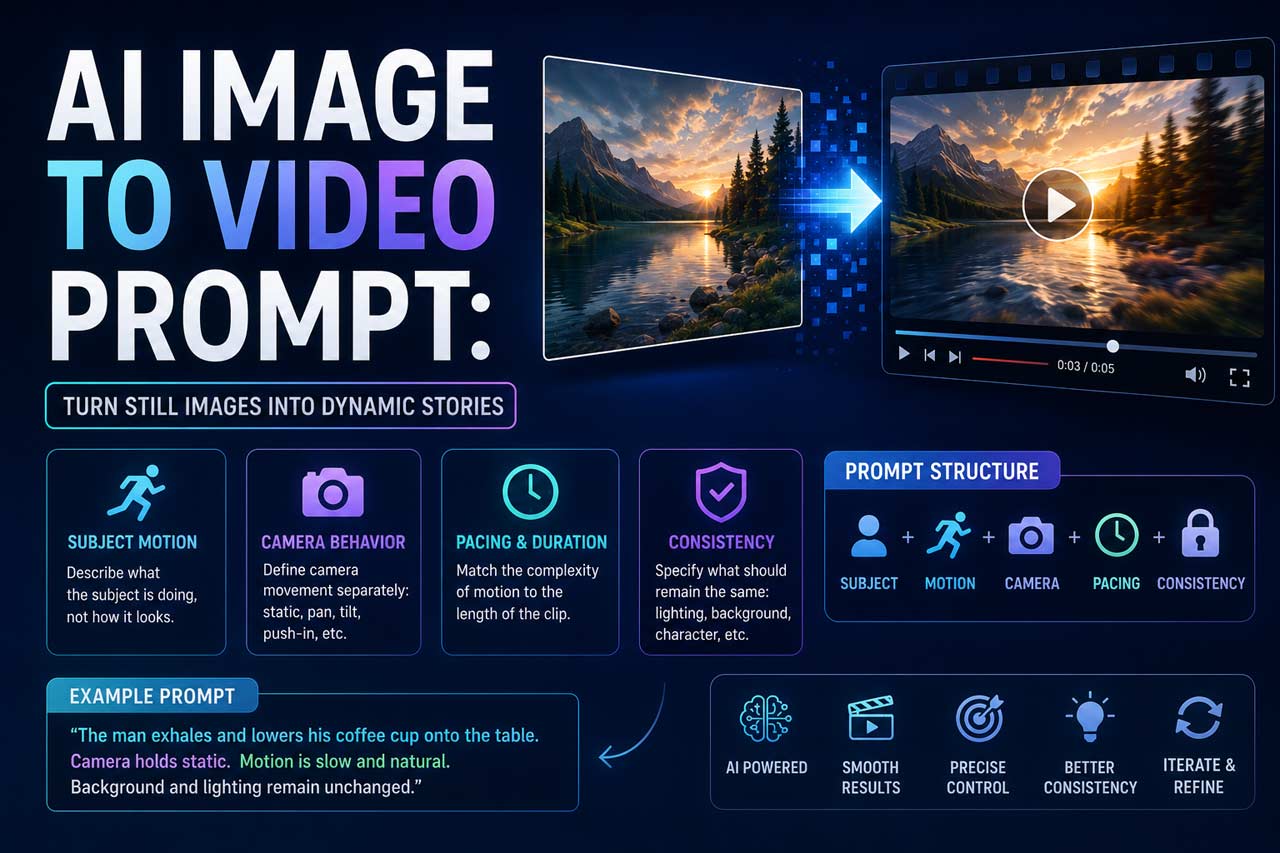
Quick answer: A prompt for successful image-to-video conversion should describe motion, camera behaviour, and timing independently of the object’s appearance. Keeping the description of the image simple and focusing on motion instead is the key step to get a good video.
What Makes an Image-to-Video Prompt Different from Text-to-Image
With still image generators, your job is to describe that particular frozen moment. Video, however, requires a completely different approach: your prompt provides the frozen moment (the source image) while the task of the model is to come up with the subsequent events. That’s a very different kind of prompting.


A lot of people simply transfer their experience from the world of text-to-image prompting and end up disappointed with results. Describing the whole scenario in great detail with plenty of adjectives sounds good until you understand that the source image itself contains all that information.
Imagine yourself a movie director and give your camera operator instructions about what happens next.
What Are the Essentials of a Prompt?
Subject Motion Before Description
Describe what the object in question is doing, rather than how it looks. “The woman slowly turns her head to the window” gives the model an action to focus on. “Beautiful woman wearing stylish dress” describes an aspect of the existing image.
In reality, it is much more efficient to use no more than one or two actions in the prompts in order to describe what the characters do. Generations from a few seconds usually contain too many errors for multiple actions.
Separate the Camera Behaviour From the Subject Motion
It is quite common to combine those two variables into one and describe a scene through the camera’s eyes. However, in order to get a quality result, it is better to separate these elements and describe them separately:
- Static shot without the camera movement
- Smooth push-in towards the character
- Pan to the right
- Handheld-style camera shaking
If you skip this step, the model will create its own assumptions about the camera movement, and they are often wrong, particularly in case of wide or complicated scenes.
How Pacing and Duration Contribute to Realism
Most image-to-video converters create short clips of only a couple of seconds. This is an insufficient amount of time to create any noticeable changes, which is why more ambitious prompts (“the scene transitions from day to night while a storm starts to brew“) tend to degenerate into visual garbage. Rescaling the request in proportion to the duration of the output is one of the more undervalued tricks: a small change is seen as intentional, while an exaggerated one is read as faulty.
Physical Consistency Prompts
Adding a short prompt about what has to *remain consistent* (“background is still”, “lighting stays the same”, “face is not changing”) adds a hint of physical continuity to the scene, thus anchoring the areas that should remain untouched. It is a minor addition to the prompt, but in practice, it greatly reduces the warping and drifting visible in longer generations.
A Workable Structure
Here is what a good structure will look like:
[Subject] + [specific motion] + [camera behaviour] + [pacing/duration] + [what stays fixed]
Like so: “The man exhales and lowers his coffee cup onto the table. Camera holds static. Motion is slow and natural. Background and lighting remain unchanged.”
This is not an exciting prompt. It is, actually, a very boring prompt and that is why it tends to work. Leave the ambition for a second or third generation after you have made sure the basic motion works correctly.
A Prompt Worth Trying
Suppose that you have a still image of a lighthouse at dusk and you want it to feel alive, but without becoming an entirely different scene. Do not go with “a dramatic storm rolling in with crashing waves and lightning“; instead, go with “waves gently rise and fall against the rocks, light from the lighthouse pulses slowly, camera remains static, sky stays consistent.” It is a small request, but it is the type of small request these models were built to handle.
5 Example Prompts You Can Adapt
Each of these follows the [Subject] + [motion] + [camera] + [pacing] + [what stays fixed] structure. Swap the subject for whatever is in your own source image, but keep the shape of the sentence intact.
- Portrait, subtle life: “The woman blinks once and gives a small, closed-mouth smile. Camera holds completely static. Motion happens over the full clip, slow and natural. Hair, lighting, and background remain unchanged.“
- Product shot, gentle reveal: “The bottle rotates a few degrees on its base, catching the light differently. Camera does a slow push-in, no panning. Rotation is gradual across the whole duration. Background stays plain and unmoving.“
- Landscape, ambient motion: “Clouds drift slowly from left to right and leaves on the trees sway slightly in the wind. Camera remains fixed in place. Movement is gentle and continuous. Mountains, colours, and light stay consistent throughout.“
- Food photography, steam and texture: “Steam rises softly from the bowl of soup. Camera holds static, no movement. Steam motion is slow and continuous for the full clip. Bowl, table, and lighting remain fixed.“
- Character in motion, single action: “The man turns his head to look over his shoulder, then looks back to the camera. Camera pans very slightly to follow the motion. Action completes within the first half of the clip, then holds still. Clothing, background, and lighting stay the same.“
Common Mistakes That Ruin Output
- Overloading the prompt: Five different actions happening at once in three seconds almost guarantees that nothing will look right.
- Describing the image instead of the motion: The model already knows the image, so repeating it doesn’t add anything to the prompt.
- Forgetting about the camera: An undefined camera is not a neutral decision but a guess made by the model on your behalf.
- Asking for major transformations in too short a period: As of 2026, most consumer-grade tools work in short time windows, so expecting too many changes in them tends to create artifacts.
- Skipping iteration: It’s rare to achieve perfect results in the first generation; think of it as a sketch of your desired motion, not the final product.
Limitations Worth Considering
However perfect your prompt might be, it still won’t solve any problems with the image itself. Noisy backgrounds, weird postures, and low-resolution images will always yield poorer results regardless of how detailed your description of motion was. Moreover, various platforms interpret prompts differently what works great on one website may require some editing on another one. In other words, there’s no universal prompt, working similarly everywhere so a bit of experimentation is only natural here.
FAQs
What distinguishes an AI image to video prompt from text to image prompt?
While image to video prompts concentrate on motion, timing and camera actions, text to image prompts focus on creating a scene from scratch.
How long an AI image to video prompt should be?
Typically short and concise a couple of sentences on the subject’s movement, camera actions and things which should remain static would work better than a descriptive paragraph.
Why is my AI video distorting objects?
The most common reason behind such an outcome is the excessive request in terms of the duration of the clip. Complex backgrounds and postures also contribute to such a result.
Can I move the camera independently of my subject?
Yes, and it’s something you should do consciously. Referring to the type of movement you want from the camera. Static, pan, push-in, usually generates more predictable outputs than an undefined prompt.
Will the same prompts work on all AI video generators?
No. Each AI engine will interpret the prompt slightly differently, so what works well on one AI generator might not work on another.